
Choose your access technologies
Combine Starlink, VSAT, OneWeb, LTE/5G and L-band in a multi-link WAN. WatchGuard SD-WAN supports dynamic path selection and configured failover, with routing and priorities set around the traffic.

Onboard infrastructure
The network. The servers.
The software your vessel runs.
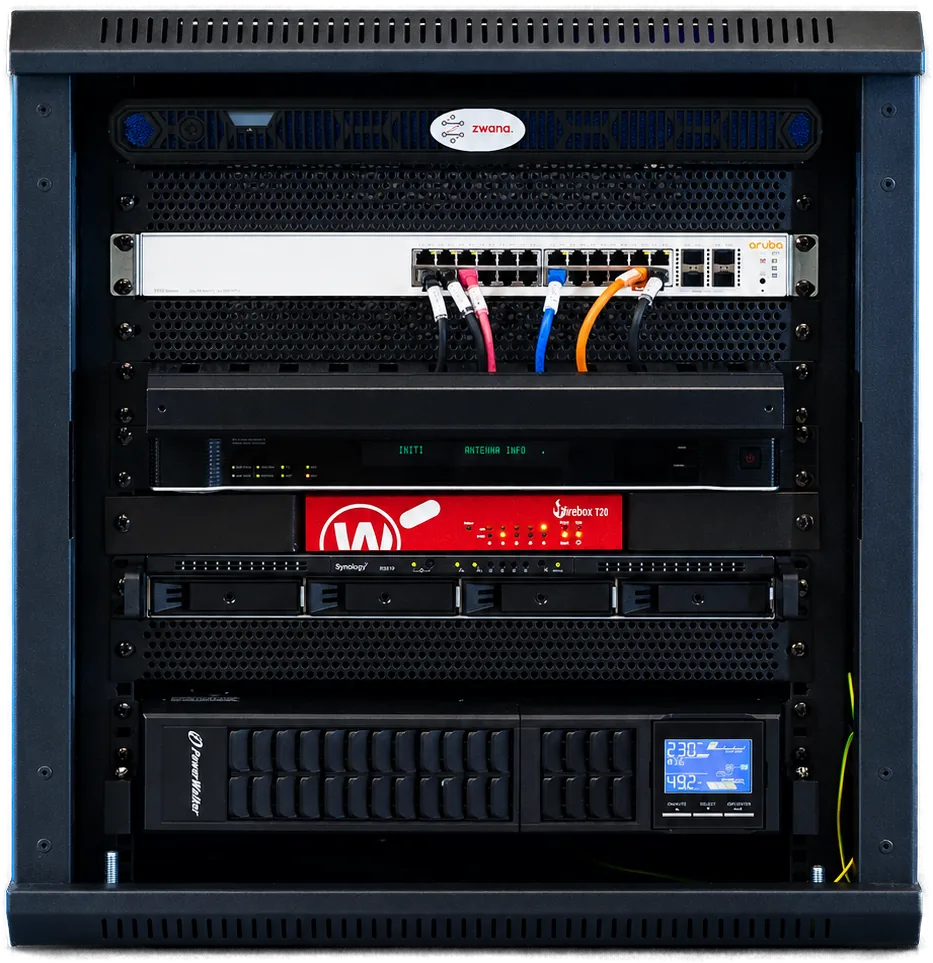
Route satellite and mobile links, host business applications and manage crew internet from one onboard platform.
What Zwana does
Bring network access, computing and storage together. One Net configures the platform around your vessel’s applications and supports it from shore.
Combine Starlink, VSAT, OneWeb, LTE/5G and L-band in a multi-link WAN. WatchGuard SD-WAN supports dynamic path selection and configured failover, with routing and priorities set around the traffic.
Host business applications in virtual machines on board. The published range includes Dell PowerEdge XR5610 server configurations, with RAID, NAS, UPS and redundant-power options sized for the deployment.
Use VLAN segmentation, quality-of-service policies and per-VLAN WAN selection to separate crew, business and operational traffic. WatchGuard UTM provides the gateway controls; EDR and SOC services are available through Sentrify.
Connect the platform to infrastructure monitoring, patch policies, backup and maintenance through abela IT.
Zwana services
Beyond the infrastructure itself, Zwana hosts the onboard services shore teams and crew depend on. Availability and configuration are agreed for each deployment.
Bring hardware, software and connectivity observations together to understand the vessel’s ICT environment.
Give crew individual internet accounts with visible allocations and flexible credit arrangements.
Look beyond total vessel consumption to see where capacity is being used.
Run a virtual voice server within Zwana for onboard and ship-to-shore calling.
Configure the foundation
Zwana Nexus brings the onboard infrastructure and its services together. Begin with the workloads and equipment you already have, then define the computing, network controls, storage and management needed for the vessel.
Bring Starlink, VSAT, OneWeb, LTE / 5G and L-band into a managed WAN. WatchGuard SD-WAN provides dynamic path selection and failover policies across configured links. Define the role of each carrier, the traffic priorities and the fallback arrangements together.
The published platform includes Dell PowerEdge XR5610 edge-server configurations and virtual-machine hosting for onboard business applications. RAID storage, NAS, backup, UPS and redundant power options are reviewed against capacity and recovery needs. The final hardware specification belongs in the vessel’s configuration.
Quality-of-service rules, VLAN segmentation and bandwidth control separate traffic groups and manage how they use the available WAN. Business applications, crew access and voice can have different priorities and preferred paths. Provisioning includes site management, capacity checks and template-based activation.
One Net lists WatchGuard UTM in every configuration: stateful firewall, intrusion prevention (IPS), application control and web filtering. Endpoint detection and specialist security monitoring are additional managed-service choices through Sentrify. Their scope is agreed alongside the network configuration.
abela IT provides the management relationship around the infrastructure: asset monitoring, patch policy, virtual-machine care and remote maintenance. abela.io supplies fleet visibility from shore, while abela Pulse supports captains and crew on board. Each service has its own users and responsibilities.
The Zwana software suite
Software runs alongside the physical platform to manage access, understand consumption and support the people using the connection. The selected model and service agreement determine the modules available on each vessel.
Individual crew accounts keep data allocations and usage records separate. An e-wallet supports pre-pay and post-pay credit arrangements, with one-off or recurring complimentary allowances. Shore teams manage the service through abela.io. Review quotas, account lifecycle, billing arrangements and the links available for crew traffic.
Review consumption by subnet, user and IP address. These different views help the team understand which part of the network is using capacity and how that compares with the intended policy. Use the findings to discuss allocations, application priorities and cost control rather than treating all vessel traffic as one total.
Continuous hardware and network monitoring provides a record of connectivity availability and equipment health. Configured security sources can contribute endpoint status and firewall events. Network traffic information also feeds Data Analysis, connecting system observations with the way the connection is used.
A virtual voice server runs within the Zwana environment. Crew calling can use prepaid Chat-Card arrangements, while business calling connects ship and shore through SIP integration. Quality-of-service policies prioritise voice traffic. Review numbers, endpoints, credit arrangements and call behaviour on the available links.
Compare Zwana models
Every published model includes the four Zwana software modules and abela Pulse. Edge Lite adds Sentrify / SecOps; Edge Max also includes abela IT and abela.io.
Choose the service mix first, then size the hardware around your applications, storage and recovery needs. The model comparison describes service inclusions, rather than CPU, memory or storage specifications.
Discuss your configuration| Service | Edge Mini | Edge Lite | Edge Max |
|---|---|---|---|
| Crew Internet Café | Included | Included | Included |
| Telemetry | Included | Included | Included |
| Data Analysis | Included | Included | Included |
| VoIP · crew & business | Included | Included | Included |
| abela Pulse | Included | Included | Included |
| Sentrify / SecOps | — | Included | Included |
| abela IT | — | — | Included |
| abela.io | — | — | Included |
| abela Drive | Optional | Optional | Optional |
| Plan your vessel | Build my Zwana | Build my Zwana | Build my Zwana |
Confirm hardware, licences, service scope and portal access in the final configuration. abela.io appears in the live model table under Edge Max; shore administration described for other modules should be clarified for your selected package.
Connected services
Configured around the vessel
Choose the platform around the operation. One Net reviews the infrastructure and the managed services together. Resilience, spare capacity and recovery arrangements are design choices to specify for the selected model.
List each application, its vendor, operating system, licences, computing and storage needs. Include expected growth and dependencies on other onboard systems. Select an Edge configuration against that workload list.
Review rack space, power, cooling, cabling and terminal connections. Record the equipment to retain and the access or port window needed for installation.
Agree the order in which workloads move, the maintenance window and a rollback point. Confirm application-vendor involvement and the effect on users before changing the existing environment.
Define which data and virtual machines need protection, where backups are held and who restores them. Agree a restore test and recovery objectives; a backup schedule alone does not establish how quickly a service can return.
Keep the configuration, network diagram, access roles, licences and acceptance results together. Identify who owns platform maintenance, application support and security changes.
Talk to an expert
Review your current installation, the services you need and the configuration that brings them together.